

JavaScript Arrays 101

Introduction
Arrays are a basic and essential data structure in JavaScript. When you need to store a list of values in order for example a list of fruits, marks, or tasks arrays are the correct tool. Arrays keep values together, let you access items by position, and make it easier to process groups of data.
This article explains what arrays are, how to create them, how to read and update items, how to use the length property, and how to loop over an array. Examples are short and ready to run in the browser console.
Main Content
What is an array and why we need it
An array is an ordered collection of values. Each value in the array has a position, called an index. Arrays make it easy to work with a list of related values in one variable instead of many separate variables.
Example scenario:
- Storing favorite fruits: you could create separate variables for each fruit, but an array groups them together and makes processing simpler.
Creating an array
Use array literal notation with square brackets []. This is the most common and simple way.
// Create an array of fruits
let fruits = ["apple", "banana", "mango", "orange", "grapes"];
Avoid using the Array constructor unless you need special behavior. The literal form is clear and safe.
Accessing elements using index
Array indexes start at 0. The first element is at index 0, the second at index 1, and so on.
console.log(fruits[0]); // "apple"
console.log(fruits[2]); // "mango"
To get the last element, use length - 1:
let last = fruits[fruits.length - 1];
console.log(last); // "grapes"
Updating elements
You can change an item by assigning a new value to its index.
// Change the second fruit
fruits[1] = "kiwi";
console.log(fruits);
// ["apple", "kiwi", "mango", "orange", "grapes"]
You can also add an item at a specific index. If the index is equal to length, the item is appended.
fruits[fruits.length] = "pear"; // append
console.log(fruits);
Array length property
length gives the number of elements in the array.
console.log(fruits.length); // e.g., 6 after appending "pear"
If you set length to a smaller number, the array is truncated.
fruits.length = 3;
console.log(fruits); // now only first 3 items remain
Changing length directly is rarely needed, but it is useful to know it exists.
Basic looping over arrays
Looping lets you visit every element in the array. Here are two simple, common ways.
- Classic
forloop:
for (let i = 0; i < fruits.length; i++) {
  console.log(i, fruits[i]);
}
for...ofloop (clean and readable):
for (const fruit of fruits) {
  console.log(fruit);
}
Both loops print array elements. Use for...of when you only need each value. Use the for loop when you need the index as well.
Storing values individually vs using an array
Example with separate variables:
let f1 = "apple";
let f2 = "banana";
let f3 = "mango";
Example with an array:
let fruits = ["apple", "banana", "mango"];
Arrays are easier to loop through, change, and pass to functions. When you have more than a couple of values, prefer arrays.
Assignment (practice)
Create an array of 5 favorite movies.
Print the first and the last element.
Change the third movie to another title and print the updated array.
Loop through the array and print every movie.
Starter code:
let movies = ["Movie A", "Movie B", "Movie C", "Movie D", "Movie E"];

// 1. Print first and last
console.log(movies[0]);
console.log(movies[movies.length - 1]);

// 2. Change third movie (index 2)
movies[2] = "New Movie C";
console.log(movies);

// 3. Loop and print all movies
for (const m of movies) {
  console.log(m);
}
Try modifying the array and re-running the code in the browser console.
Visual Representation of Array Index and Values
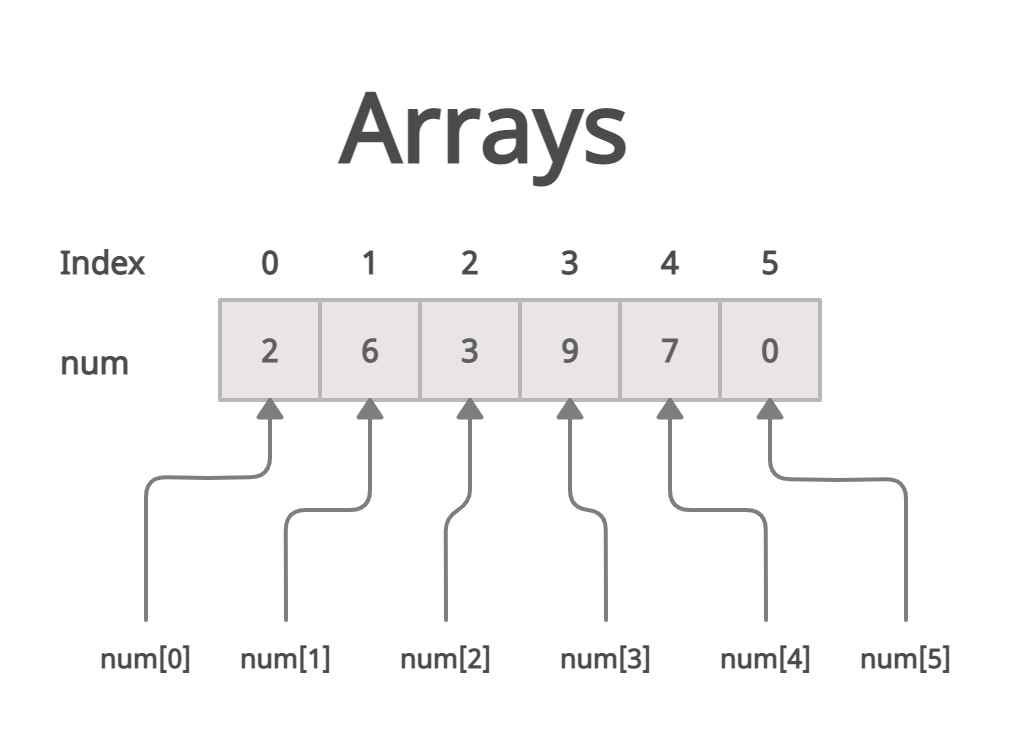
Arrays store elements in a specific order, and each element has a position called an index. In JavaScript, indexing starts from 0, not 1.
Example array:
let fruits = ["apple", "banana", "mango", "orange", "grapes"];
Visual representation:
| Index | Value |
|---|---|
| 0 | apple |
| 1 | banana |
| 2 | mango |
| 3 | orange |
| 4 | grapes |
Examples:
console.log(fruits[0]); // apple
console.log(fruits[2]); // mango
console.log(fruits[4]); // grapes
Important idea:
The index tells JavaScript where the value is stored
The first element always starts at index 0
Memory-Style Block Diagram for Array Storage

You can think of an array like a row of connected memory blocks. Each block stores one value, and each block has an index number.
Example array:
let numbers = [10, 20, 30, 40];
Memory-style visualization:
Index:    0      1      2      3
        +-----+ +-----+ +-----+ +-----+
Array:  | 10  | | 20  | | 30  | | 40  |
        +-----+ +-----+ +-----+ +-----+
Key ideas:
Each value occupies one position in the array.
The index points to the location of that value.
Arrays store values in order, which makes accessing them very fast.
Example:
console.log(numbers[1]); // 20
console.log(numbers[3]); // 40
This block-style view helps beginners understand that arrays store data in an ordered sequence of positions, each identified by an index.
Conclusion
Arrays store ordered lists of values and are fundamental for everyday JavaScript programming. You now know how to create arrays, read and update elements, use the length property, and loop over arrays. Practice the assignment and try working with different types of values inside arrays (strings, numbers, booleans). Once you are comfortable with these basics, you can move on to array methods and more advanced patterns.


